I'd recently joined a new client account, and one of the first things I noticed was the growth happening around me.
More designers were being brought on, and new Scrum teams were spinning up. This was an exciting place to be, but it also brought its challenges.
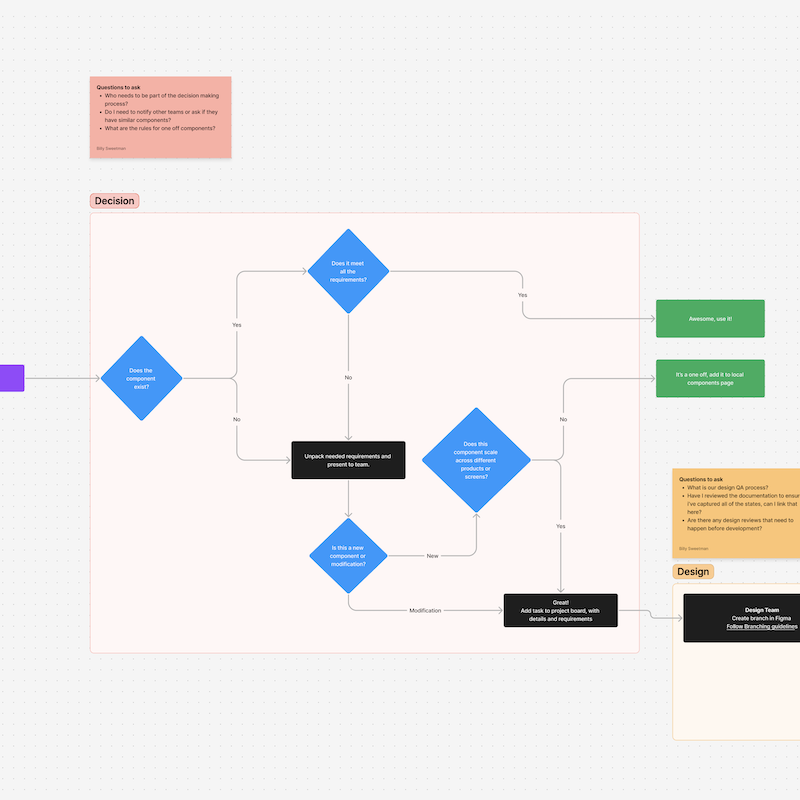
It became clear that the designers working on this product needed to figure out how to stay consistent. Before going off to solve a problem, they needed to know, “Is this a pattern already established in another part of the product?”
Each designer also needed to know, “Is it something I can build on, or is it about to change?”.
These questions led to the development of a product library.
Enterprise design system problems you might have
Duplication and rework
Two designers on different scrum teams build the same component without knowing the other one exists. Work gets thrown away or awkwardly merged after the fact.
The "is this final?" problem
A designer builds on top of another team's screen only to find out it was still in progress. Now their work needs to be redone too.
Onboarding is a time sink
Every new designer who joins the team asks the same questions, and the answers live in someone's head rather than in a documented system. Senior designers lose momentum every sprint getting people up to speed.
The enterprise system feels too far away
The design system exists, but it is broad by design. Product teams end up improvising to fill the gaps between what the system provides and what they actually need to ship.
Inconsistency creeps in quietly
No one makes a conscious decision to go off-brand. It happens gradually when teams are moving fast and don't have visibility into what other teams are doing.
Knowledge lives with a few historians
Knowing which patterns to use and which are outdated depends on who you know on the team, not what is documented.
A well-built enterprise design system is the foundation
A design system is one of the most valuable investments an organization can make.
A good design system establishes the shared language that keeps your entire product suite feeling like a family with consistent typography, cohesive color systems, and accessible components.
But what separates a good design system from a great one?
It’s flexibility.
The best design systems understand the importance of flexibility. They’re built with the understanding that they serve multiple products, each with its own unique needs. They provide guardrails and guidance, yes, but they also leave room for product teams to adapt for their specific context.
This balance between consistency and flexibility is what makes an enterprise system truly scalable.
Good tooling is not the same as good organization
Figma gives you powerful tools: branching, variants, libraries. That's not the problem. The real challenge is alignment.
Without intentional structure at the product level
- Designers solve the same problems from scratch because they can't see what already exists.
- New team members spend their first weeks tracking down knowledge instead of contributing.
- Flows get built on top of work screens that are still in progress or out of date.
It's not a tooling problem. It's an organization problem.
When designers can see and leverage patterns already in use, they spend more time focused on actual user and business needs.
Product libraries are the next layer
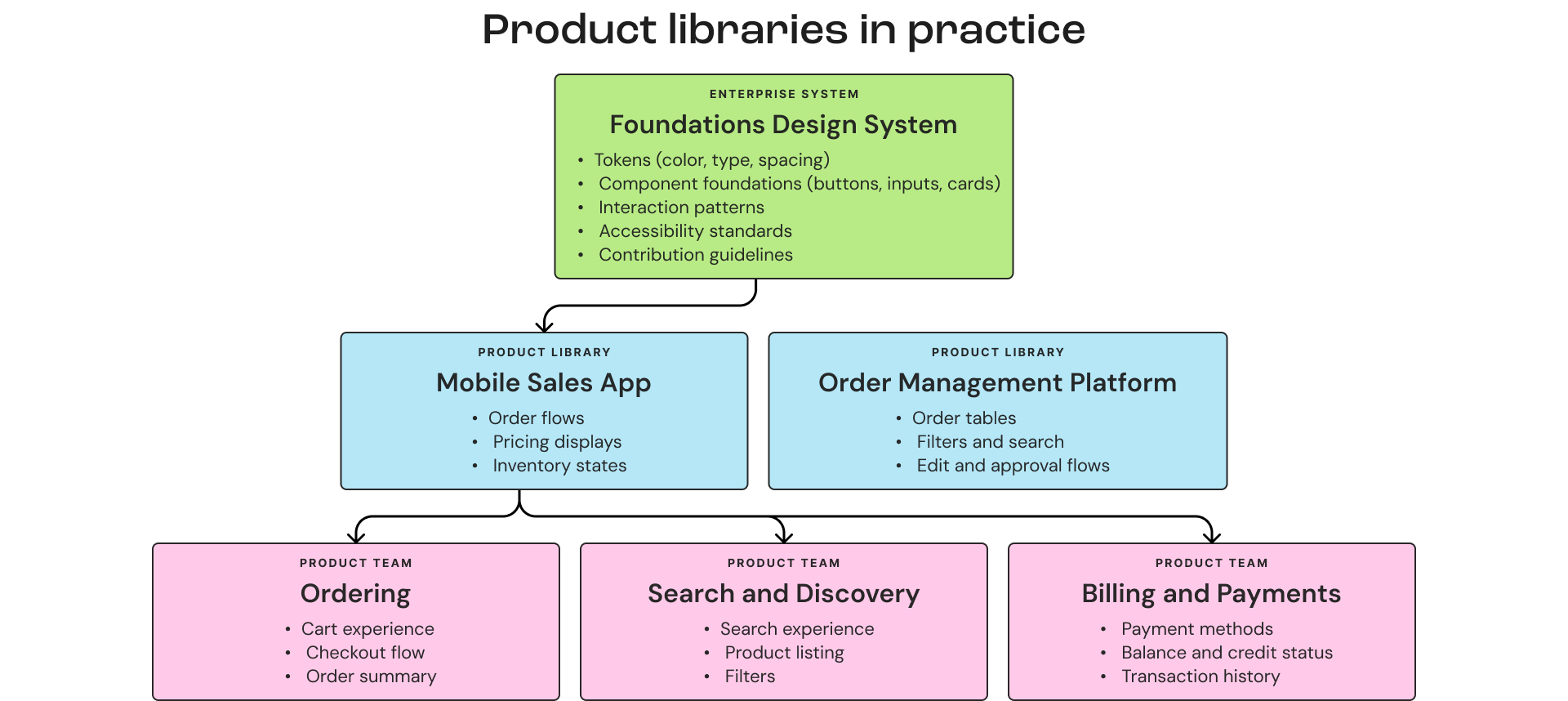
Product teams benefit from an additional layer of organization. A product library that inherits from the enterprise system and adapts it for their specific context.
The enterprise design system establishes the principles, tokens, and core components that apply everywhere. The product library curates and extends those assets to a specific product's needs. This becomes the page templates, patterns, and assembled components that designers use every day.
This is not about working around the enterprise system. It is about bringing its value closer to where the work actually happens.
In our case, this product library lives in Figma alongside the enterprise system. The structure is simple. A shared Figma project where product-specific components and page templates are organized by feature area and kept in sync with the enterprise file.
Staying connected to the main design system
I want to be clear about something. Building a product library does not mean going off on your own. The relationship between the enterprise team and the product teams is essential, and it needs to be intentional.
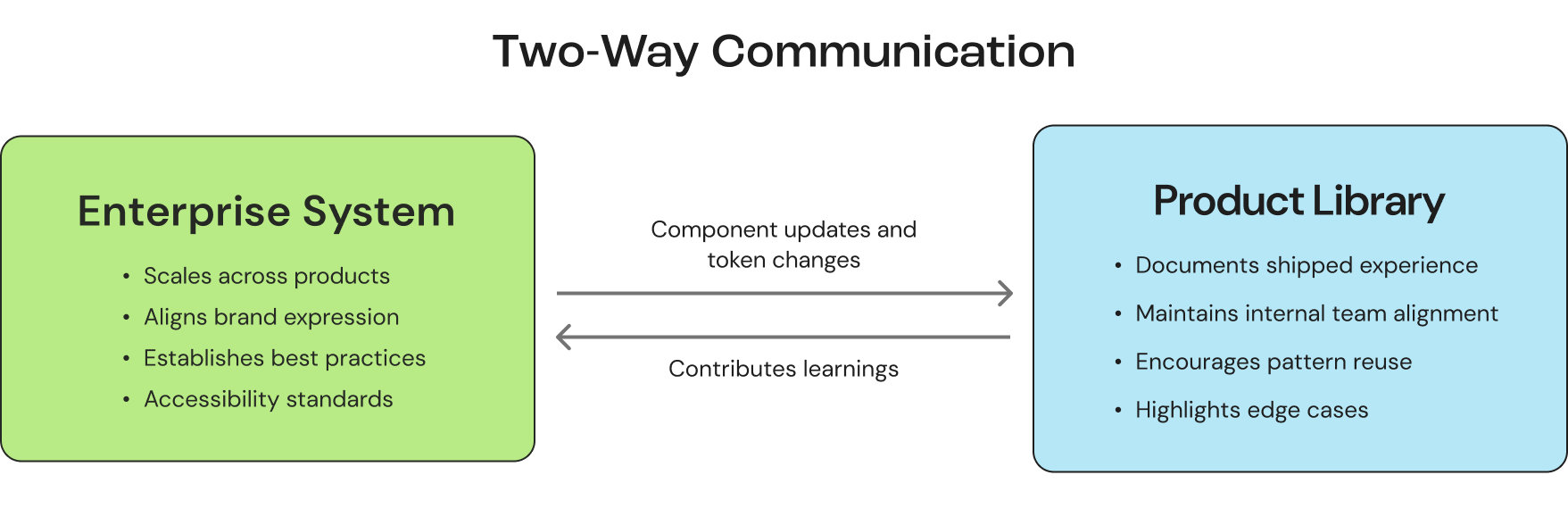
Product libraries should feed back into the enterprise system. When a product team solves a problem that other teams could benefit from, that solution should flow upstream. When the enterprise team updates a core component, product teams need to know about it and understand how it affects their library.
This is a two-way conversation. This could look like shared Slack channels and design critiques that cross team boundaries. Whatever the format, the communication needs to happen.
Those communication rhythms are what keep a system healthy over time. We break down the office hours, roadmap reviews, and surveys that do it in our guide to maintaining a design system teams actually use.
The product library is an extension of the enterprise system. Staying connected is how you keep it that way.
For example
Design tokens are one of the clearest examples of what this connection looks like in practice.
Color, spacing, typography, and elevation values should be inherited directly from the enterprise system. They should never be copied or recreated in the product library. When the enterprise team publishes an update to a token, the product library should inherit those changes with minimal disruption.
A designer should never go into a product library and manage or update tokens.
Someone needs to own this connection to create accountability
Someone on the product team needs to step into the design system champion role as the clear point of contact. Without that person, the product library slowly drifts away from the foundation it was built on.
What this can look like
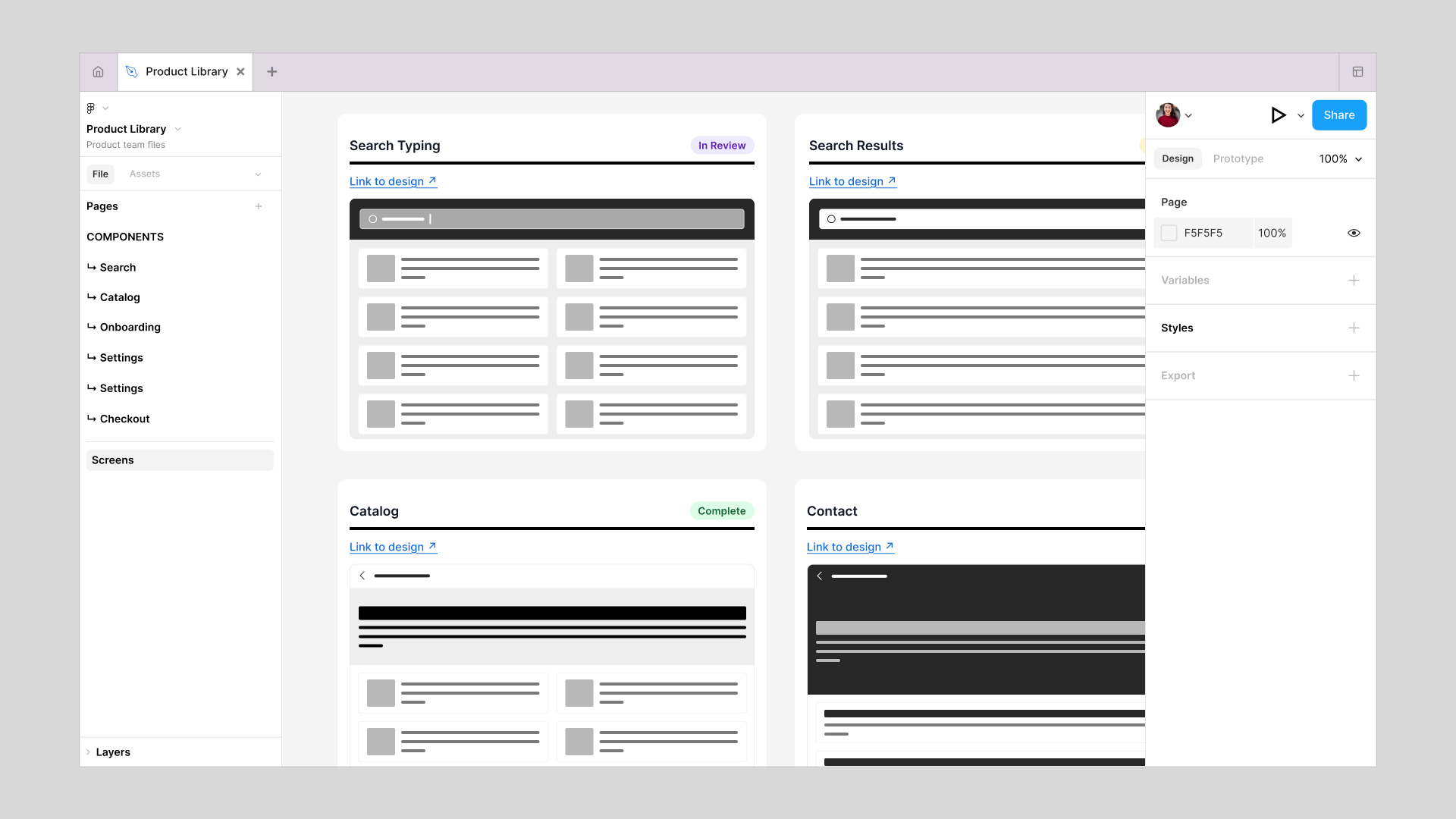
In the Figma example above, you can see a product library organized by feature area. Search, Catalog, and Contact. Each section has its own set of screens and components, with clear status indicators showing what is finalized and what is still in progress.
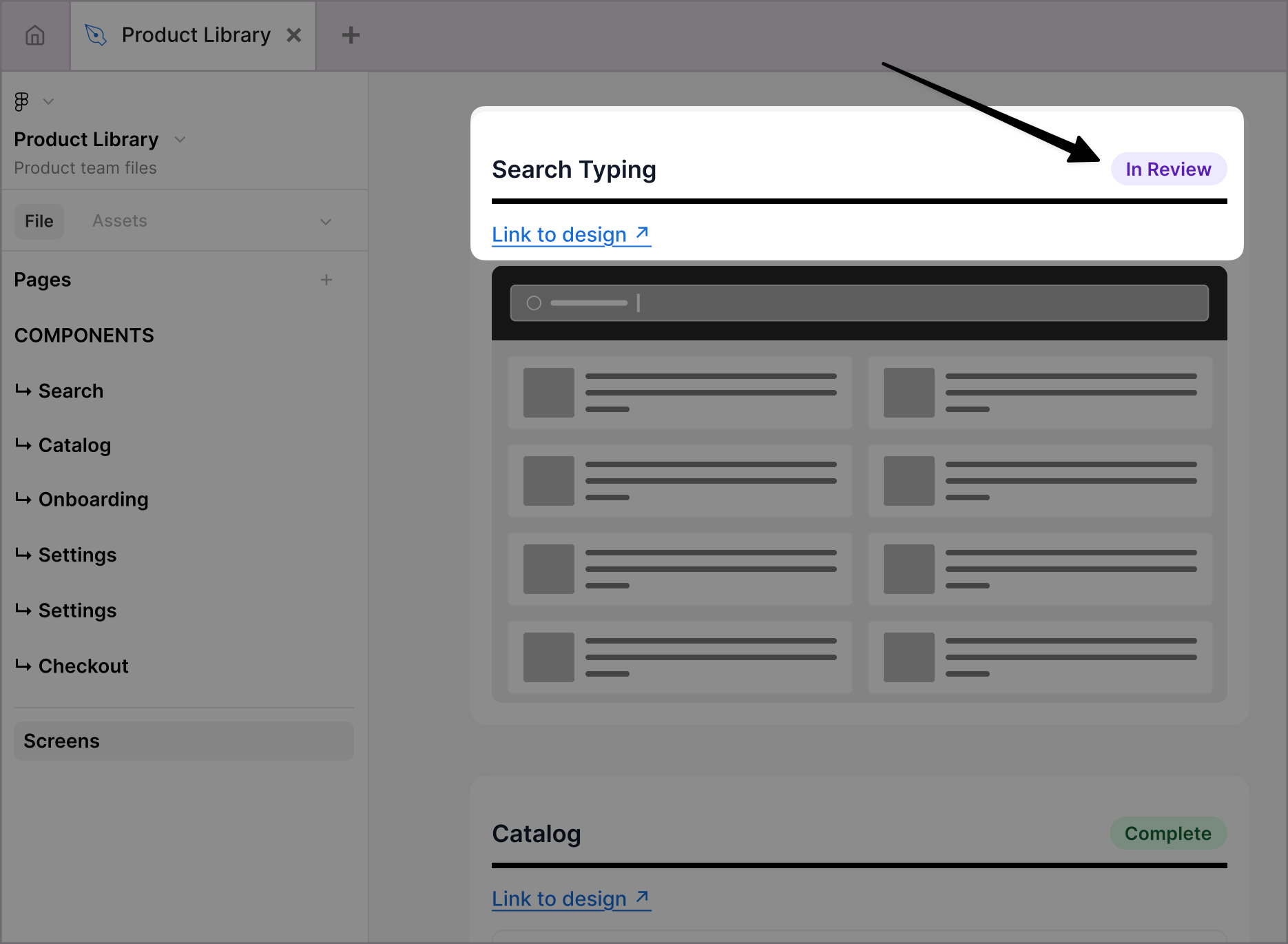
Status indicators
We landed on a small set of statuses that gave everyone what they needed at a glance.
"In Progress" meant a designer was actively working on it and it was likely to change.
"In Review" signaled that the work was close but still collecting feedback.
"Complete" meant it was finalized and safe to build on or reference.
That clarity sounds simple, but it eliminated an entire category of "hey, is this done?" messages that used to slow teams down.
The "Link to design" buttons connect every page back to the source file where decisions were made. Designers can move between the library and their working files effortlessly, always confident they are using the right assets.
The value a product library provides
When you layer a product library on top of your enterprise foundation, you unlock a new level of efficiency and collaboration, moving your organization up the agent-ready design system levels.
It amplifies the enterprise system's value
The enterprise system's tokens and components get used more consistently because they are integrated into the product team's daily workflow. Instead of referencing a distant source of truth, designers are working directly within a system that is built on that foundation.
It enables product-specific flexibility
Every product has unique challenges. Specific user flows, industry requirements, or feature sets that require tailored solutions. A product library gives teams the space to solve those problems while staying fully aligned with the broader brand.
It strengthens collaboration across Scrum teams
The Search team and the Orders team are pulling assets from the same place. Everyone can see what exists, what is in progress, and what is ready to build on. No more accidentally duplicating work or building on top of something that is about to change.
It accelerates onboarding
This is huge, especially for growing teams. I have been the new designer, trying to get up to speed, and I have also been the one answering questions from new teammates.
A product library changes that experience completely. New designers can see exactly what components their product uses, how screens are organized, and what has already been solved. They are building on documented decisions and established patterns. The time from "first day" to "meaningful contribution" shrinks dramatically.
This is how consistency actually happens
As teams grow, consistency breaks because they lack visibility.
A product library solves that.
It gives designers a clear view into what already exists, what is in progress, and what is safe to build on. It connects work across Scrum teams so designers are not solving the same problems in isolation. At the same time, it ensures everything being created stays aligned with the enterprise design system.
This is where the real value shows up. The enterprise design system establishes the rules, but the product library is how teams actually use them.
When both are working together, consistency becomes a natural outcome of how the work gets done.