A design system for AI agents is one an agent can read and follow without a person translating it first. That means tokens, components, and usage rules that live in code and documentation an agent can parse, not in a designer's head or a buried review comment. Get this right and an agent builds UI that matches your standards. Get it wrong and it produces drift at machine speed.
There are two halves to getting it right, the design side and the engineering side, and they have to meet in the middle. Here's what "agent-ready" actually means, why it matters more than it did a year ago, and how to get your system there.
Want to see and hear what our design system experts have been experiencing in real teams and products?
Check out our latest live stream below where we cover everything in this article. We also answer live questions from design and product leaders like yourself.
What is a design system for AI agents?
It's the same design system you already know, with one added requirement: a machine can use it.
A traditional design system points people to the right button, spacing, and pattern. An agent-ready one does that same job for an AI agent, while still serving the humans who design and build with it. The rules have to be explicit, structured, and readable by code, because an agent can't ask a teammate what "use the primary button here" really means.
Think of it as an instruction set. The clearer the instructions, the more reliable the output.
Why do agents need this more than people do?
Because agents drift faster.
A developer who's slightly unsure about a pattern will usually pause, ask, or copy a nearby example. An agent won't. It fills the gap with a guess, then repeats that guess everywhere. As our crew talked through on Even-Keeled, the benefits of a design system get accentuated with agentic workflows, and so do the costs of a loose one.
So the value of a good system goes up when agents enter the picture, not down. AI amplifies whatever you already have. A strong system gets faster. A weak one gets messier, faster.
What makes a design system agent-ready?
Five things.
Machine-readable tokens
Your colors, spacing, type scale, and other primitives need to exist as structured values an agent can read directly. That means tokens in JSON, CSS variables, or some published format an agent can reach. Screenshots don't count. Neither do hex codes pasted into a comment thread or a spacing scale that only lives in a designer's head. When the primitives are structured, an agent pulls the exact value instead of approximating it, and you stop finding fourteen slightly different grays in production. Structure also makes the reverse trip possible. We used ours to re-skin an entire design system for a client brand in a couple of hours, contrast checks included.
Documented component APIs
Every component needs its props, states, and intended use written down. An agent choosing between a Button and an IconButton has no instinct to fall back on, so the documentation is the instinct. Spell out what each prop accepts, which states exist, and when to reach for this component instead of the one next to it. Skip that and agents build one-off components that look right and behave wrong, and your system quietly grows a shadow copy of itself.
Design-to-code parity
Your Figma and your coded components should match one-to-one: names, states, and structure. When the two drift apart, an agent has to reconcile two sources of truth, and it guesses. As Billy Sweetman put it on Intent and Craft, everything in Figma should be one-to-one with the coded environment before agents start traversing it. Parity is unglamorous work, but it's the difference between an agent that reads your system and an agent that invents one.
Usage rules that live in code and docs
Tokens and components tell an agent what exists. Usage rules tell it how the pieces fit together: which patterns are approved, how components compose, what happens at each breakpoint, when a modal beats a full page. Most teams carry that knowledge in review feedback, which works fine for people and not at all for agents. Move it into machine-readable form, whether that's lint rules, docs, or a design.md, and the guidance shows up while the work is happening instead of after it's done. Tim Gremore walks through what belongs in a DESIGN.md file and what to leave out on Intent & Craft.
A way to feed context
The last piece is a channel that hands the agent your system while it builds. That might be an MCP server, a static agents file checked into the repo, or a routing setup that points the agent at the right docs for the task at hand. Pick whatever fits your stack. What matters is that the system reaches the agent automatically, because a design system an agent has to be reminded about is one it will skip. If you want agents pulling from your actual tokens and component rules instead of guessing, that's what a design system MCP built on your own system does. it serves your system to every AI tool, not Figma's generic API.
Note: Miss the first four and the fifth has nothing good to serve.
Who owns keeping it agent-ready?
Someone has to. It's the least technical requirement on the list and the one teams skip most.
As Billy said on that same episode, if everyone assumes somebody is keeping the system healthy, that usually means nobody is. Parity slips, documentation ages, one-off tokens pile up. With agents in the loop, that neglect compounds at machine speed. Name an owner for parity, documentation, and drift, and the whole thing holds together. Leave it to "the team," and it quietly rots while your agents scale the rot.
Ownership only works if the owner can see what's happening. Adoption reporting tells you the system is installed. Tracking whether teams are actually engaging with it tells you whether it's holding, and it moves the month the relationship does instead of a quarter later. Agent-readiness is a people question too. Once the system is ready, here's what a design team needs to be able to do with it.
If nobody on your team has room to own it, that is a staffing question before it is a tooling one. Our design system training and build work covers both answers: teaching your designers to run the system themselves, or putting a crew on it alongside them.
How do agents actually get your design system?
There are three common approaches, and our crew has shipped all three:
- A design system MCP. A live connection that gives the agent real-time access to your component APIs. Best for organizations with multiple products pulling from one system. We build custom design system MCPs on a team's own tokens and components.
- An agents file. A static markdown file that documents the system in plain text. Simpler to set up, and often enough for a single product.
- Routing. Directing the agent to the right context file based on the task, so it isn't loading everything at once.
Example of how this works
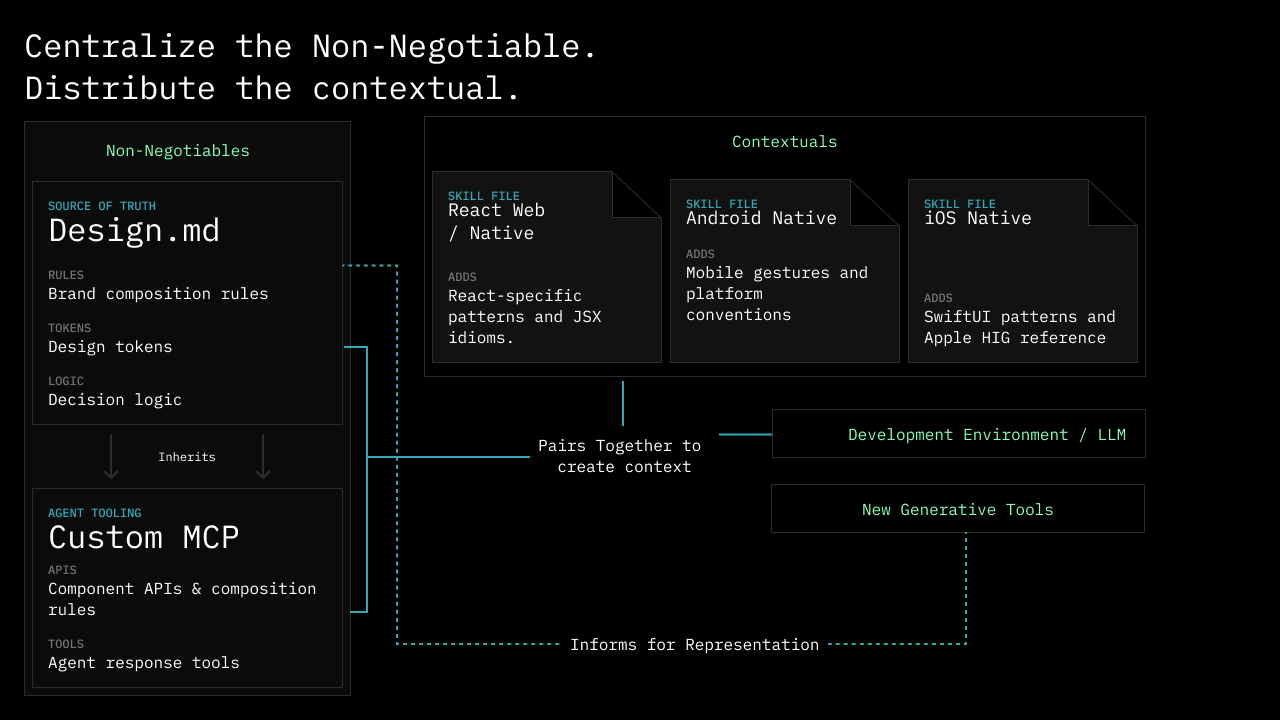
You don't need the most complex option to start. A well-written agents file, built on well-documented foundations, gets many teams to reliable output.
How do you make your system agent-ready?
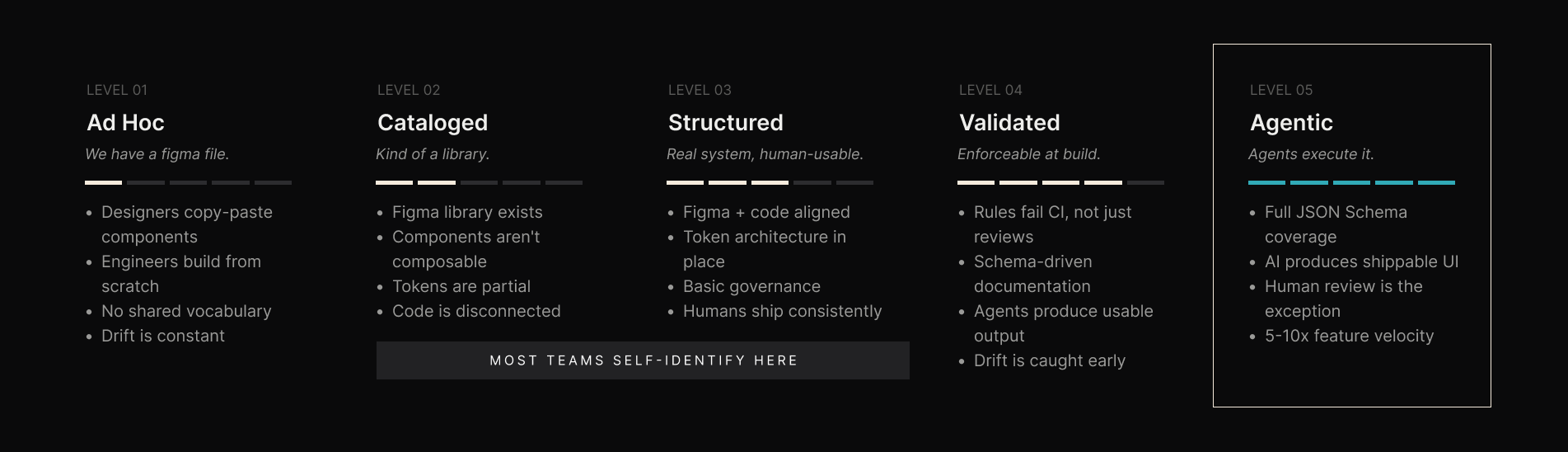
Start by being honest about where it is today. Most teams overestimate their maturity. Our crew mapped this into five levels of an AI-ready design system, from ad hoc Figma files an agent can't use at all, up to a fully agentic system that produces shippable UI with light review. For most teams, the highest-return move is the jump from "structured for humans" to "validated in code," where the rules fail CI instead of waiting for a person to catch them.
A practical path
- Get your tokens out of design tools and into structured, theme-based files.
- Bring Figma and code into parity, matching names, states, and structure so there's one source of truth.
- Document each component's props and intended use right next to the code.
- Move your usage rules from review comments into checks a machine can run.
- Pick one context method, and an agents file is a fine start, then connect it.
- Name an owner and add enforcement, so drift fails automatically instead of shipping.
You don't have to do all six at once. Each step makes the next agent you point at your product more reliable.
Common mistakes
Pasting screenshots
A Figma screenshot looks perfectly clear to you. To an agent, it's pixels. It has to guess at the zoom level, infer spacing from a crop, and eyeball colors that may have been compressed on the way in. Even when it guesses well, the screenshot carries none of the intent behind the component: which one this is, what state it's in, why the padding is 24 and not 20. Hand over the token or the component reference instead, and the guessing stops.
Assuming shared context
Teams skip documentation because everyone in the room already knows. The naming convention is obvious, the composition rules are understood, and the one weird exception gets explained in Slack when it comes up. An agent has none of that. It shows up to every task as a first-time viewer with no memory of the last six months of decisions you made together. Write down what you'd normally leave unsaid, especially the exceptions, because those are the first thing an agent gets wrong.
Confusing a UI kit with a design system
A UI kit is a set of components. A design system is those components plus the rules for how they compose: hierarchy, spacing relationships, approved patterns, and what to do when nothing quite fits. People can work from a UI kit because they fill the gaps with taste and experience. Agents fill gaps with whatever is statistically likely, which is how you get a screen that's technically on brand and clearly nobody's decision. The rules are the part that makes a system usable by a machine.
Skipping enforcement
If nothing fails when a pattern breaks, an agent will break it confidently and often. Documentation on its own is a suggestion. Enforcement is what makes it real: lint rules, type-safe props, CI checks, and tests that fail when a component gets used outside its intended shape. People catch drift in code review, eventually. Agents work faster than review does, so the check has to live where the work happens.
Where to start
Pick your highest-traffic product surface and make that one agent-ready first. Get its tokens structured, bring its Figma and code into parity, document the components it uses, and connect a single agents file. Point an agent at it and see how close the output lands. That short loop teaches you more than a full audit will.
If you'd rather have a crew that's already walked this path do it with you, that's the kind of work we do. See how we approach design systems for development.